Azure Reserved VM Instances have long been one of the most effective ways to reduce compute costs for predictable workloads. But Microsoft is making two important changes that architects, platform teams and FinOps practitioners need to plan for now.
1. Legacy VM reservations stopped being available from July 1, 2026
Microsoft has ended new purchases and renewals for selected legacy Azure Reserved VM Instances from July 1, 2026. Existing reservations are not cancelled; they continue to provide discounts until their individual expiry dates.
The impacted one-year reservation families include Av2, Amv2, Bv1, D, Ds, Dv2, Dsv2, F, Fs, Fsv2, G, Gs, Ls and Lsv2. Both one-year and three-year reservations are affected for Dv3, Dsv3, Ev3 and Esv3.
This is primarily a cost-management change, not a workload outage. Your VMs keep running, but once an affected reservation expires you can no longer simply renew it. If nothing is done, the workload may fall back to pay-as-you-go pricing.
2. Reservation exchange rules change on February 1, 2027
Microsoft is also tightening the exchange policy for reservations. Starting February 1, 2027, reservations purchased after that date will not be exchangeable when the corresponding service is covered by a savings plan. This includes Azure Virtual Machines and several other compute and database services.
Reservations purchased before February 1, 2027 retain the right to one final exchange after that date. Instance-size flexibility for VMs is not affected, and Microsoft has not changed the existing cancellation policy. The cancellation limit remains USD 50,000 of commitment in a rolling 12-month period per billing profile or enrollment.
Why Microsoft is pushing customers toward Savings Plans
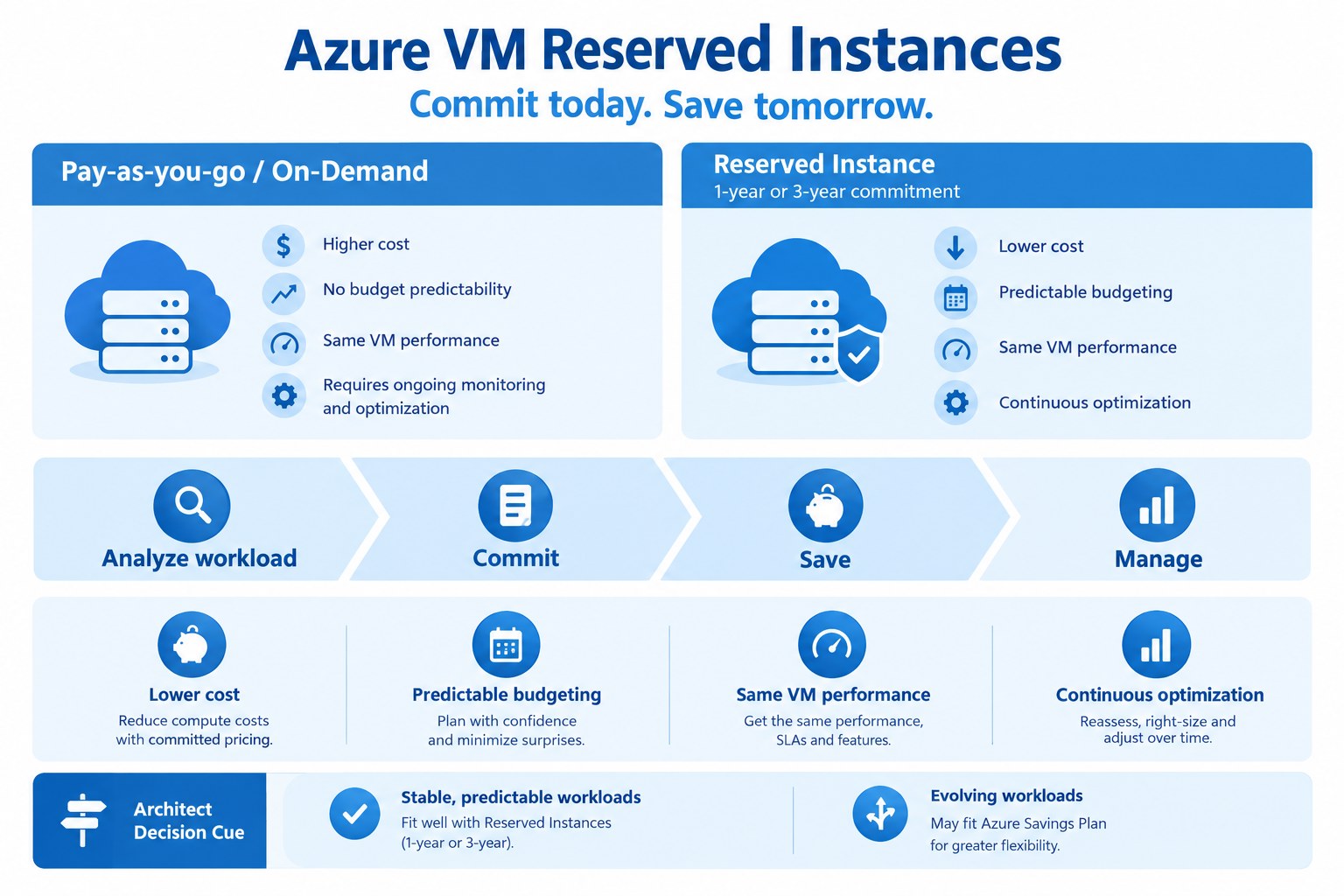
The strategic direction is clear: Microsoft wants customers with changing or evolving compute estates to use Azure Savings Plan for Compute. Unlike a VM reservation, a savings plan is based on a fixed hourly spend commitment and can automatically apply discounts across eligible compute services, regions and VM families.
That makes savings plans attractive when workloads are dynamic, regions may change, or a modernization program is already underway. Traditional reservations can still be the better fit for highly stable workloads where the VM family, region and usage pattern are unlikely to change.
What architects should do now
- Inventory your reservations. In the Azure portal, review Reservations and filter for Virtual Machines. Check the VM family and expiry date.
- Identify legacy VM families. If you are running v1, v2 or v3 generations that are affected, treat the RI expiry date as a modernization milestone.
- Start planning 6–12 months before expiry. Do not wait until the final month. Align the decision with application refreshes, migration windows and budget cycles.
- Model Reservation versus Savings Plan scenarios. Stable workloads may still justify RIs on newer VM generations, while changing workloads may benefit from the flexibility of a savings plan.
- Avoid accidental PAYG fallback. If an RI expires without a replacement commitment or modernization plan, the VM continues to run but billing may increase immediately.
A practical decision rule
I would use a simple architecture principle: predictable workload = reservation; evolving workload = savings plan. If your application roadmap includes re-platforming, resizing, region changes or autoscaling, flexibility usually has more value than locking into a specific VM reservation.
For legacy estates, this policy change is also a useful trigger to revisit whether the VM itself should still exist. A reservation decision should not become a reason to preserve an outdated architecture.
Final thoughts
The July 2026 and February 2027 changes do not remove the value of Azure Reservations. They do, however, make commitment planning more architectural than before. Cost optimization, modernization and platform strategy now need to be considered together.
My recommendation: review all active VM reservations now, flag affected legacy families, and create an explicit decision for each expiry date: modernize, move to a newer RI, or shift to an Azure Savings Plan.
Official Microsoft references
- Transition guide for retired Azure Reserved VM Instances
- Changes to the Azure reservation exchange policy
- Self-service exchanges and refunds for Azure Reservations
Reservation Planning Checklist
Track reservation utilization, expiry dates and ownership. Compare future workload demand and modernization plans before committing to new purchases. Validate the latest eligibility and exchange policy before making changes.
Establish an accountable owner for every production integration and document the intended outcomes before deployment. Review permissions, change approval, monitoring and recovery procedures as part of the design. Keep evidence of validation so the implementation can be reassessed when business requirements or service capabilities change.
Operational Review
| Area | Validation |
|---|---|
| Security | Identity, permissions and data boundaries |
| Operations | Monitoring, escalation and rollback |
| Governance | Ownership and audit evidence |
Frequently Asked Questions
What should teams validate before rollout?
Run representative tests, review failure scenarios and confirm the solution meets its documented security, reliability and operating requirements.
How can progress be measured?
Compare results against a baseline and track quality, operating effort, exceptions and service reliability over time.
Related reading: Azure cost optimization, Azure service models and Enterprise architecture foundations.