Why agent currency matters
For enterprise Azure solution architects and hybrid cloud platform engineers, the fundamental challenge of managing distributed infrastructure is rarely initial provisioning. Instead, it is the ongoing lifecycle management, security posture enforcement, and configuration drift prevention across thousands of heterogeneous servers operating outside traditional Azure datacenters. The Azure Connected Machine agent serves as the core telemetry and management bridge between your on-premises virtual machines, edge devices, multi-cloud instances, and the Azure control plane. Ensuring that this agent remains up to date, secure, and fully functional across a massive distributed footprint is a critical operational requirement.
This article presents a comprehensive, practical decision framework and architectural blueprint for implementing Azure Arc Automatic Agent Upgrade. By leveraging Microsoft-managed upgrade mechanisms, platform teams can eliminate manual intervention overhead, mitigate security vulnerabilities associated with outdated agent versions, and maintain compliance across diverse hybrid fleets. We will examine the core architecture, a structured implementation checklist, security governance guardrails, reliability considerations, operational readiness playbooks, and FinOps financial optimizations required for enterprise-scale adoption.
How automatic upgrades work
Managing hybrid infrastructure at enterprise scale introduces significant administrative overhead. Traditionally, updating the Azure Connected Machine agent required custom scripting, configuration management tools like Ansible or PowerShell DSC, or manual patching cycles. These fragmented approaches frequently introduce human error, inconsistent agent states, compliance gaps, and unexpected maintenance windows that disrupt business operations. Azure Arc Automatic Agent Upgrade shifts this paradigm by delegating agent lifecycle management directly to the Azure platform control plane.
A sound adoption decision must evaluate how automated upgrades intersect with your organization’s core IT disciplines:
- Identity and Access Management: Ensuring that service principals and managed identities used by Arc-enabled servers have appropriate permissions to receive agent updates without breaking least-privilege principles.
- Network Boundaries: Accounting for outbound firewall rules, proxy configurations, and service tags required for the agent to communicate with update endpoints and download packages securely.
- Deployment Automation: Integrating automatic upgrade configurations into your infrastructure-as-code (IaC) pipelines using Bicep, Terraform, or Azure Resource Manager (ARM) templates.
- Logging and Observability: Centralizing upgrade telemetry, success/failure logs, and version auditing through Azure Monitor and Log Analytics workspaces.
- Disaster Recovery and Resiliency: Designing rollback strategies and exception handling for workloads that require frozen agent configurations due to third-party software dependencies.
- Total Cost of Ownership (TCO): Balancing the engineering hours saved against potential API usage, storage, and telemetry costs associated with large-scale fleet management.
A staged rollout strategy
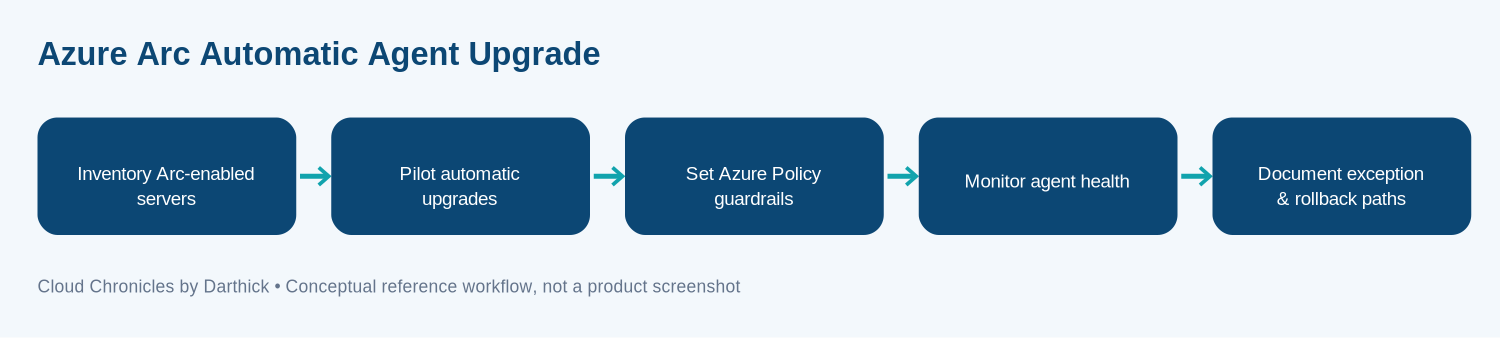
Deploying automated agent upgrades safely requires a structured operational sequence that integrates with your existing landing zone governance model. The conceptual implementation flow moves through five distinct phases, designed to minimize disruption and maximize visibility across your hybrid server inventory.
The delivery flow begins with comprehensive asset discovery, categorizing all Arc-enabled servers by operating system, environment, and business criticality. Next, platform engineers establish pilot rings, starting with non-production sandboxes, to validate the upgrade mechanism under realistic network and load conditions. Once stability is confirmed, organizations apply Azure Policy guardrails to enforce automatic upgrades at scale, backed by continuous monitoring of agent health metrics and telemetry. Finally, operations teams establish formal exception pathways and rollback procedures to handle edge cases where automated updates conflict with legacy application dependencies.
Fleet policy
Inventory Arc-enabled servers
Inventory Arc-enabled servers is a distinct design and operational checkpoint. Define the owner, expected input and output, failure modes, access controls, and evidence required before production rollout. For this topic, apply the checkpoint to azure arc automatic agent upgrade, then document the trade-off between managed services and custom implementation. Fleet visibility is the bedrock of any successful upgrade strategy. You cannot automate what you cannot measure or locate within your resource graph.
Platform teams must query Azure Resource Graph to extract precise version distributions of the Connected Machine agent across Windows and Linux distributions. This step identifies stranded agents, deprecated operating system versions, and disconnected machines that require manual remediation before platform-level policies can take effect. Documenting ownership for each subscription and resource group ensures accountability during troubleshooting phases.
Pilot automatic upgrades
Pilot automatic upgrades is a distinct design and operational checkpoint. Define the owner, expected input and output, failure modes, access controls, and evidence required before production rollout. For this topic, apply the checkpoint to azure arc automatic agent upgrade, then document the trade-off between managed services and custom implementation. Never deploy automatic upgrades globally on day one.
Establish a staged rollout strategy beginning with internal development and test servers. Monitor these pilot groups closely for any unexpected service restarts, network throttling, or dependency conflicts with local security tools, endpoint detection and response (EDR) agents, or database engines. Collect quantifiable performance metrics and error logs during this phase to establish a baseline for broader production deployment.
Set Azure Policy guardrails
Set Azure Policy guardrails is a distinct design and operational checkpoint. Define the owner, expected input and output, failure modes, access controls, and evidence required before production rollout. For this topic, apply the checkpoint to azure arc automatic agent upgrade, then document the trade-off between managed services and custom implementation. Governance at scale requires automated policy enforcement rather than relying on manual administrative discipline.
Utilize built-in Azure Policy definitions designed for Azure Arc to audit and remediate agent upgrade settings across your subscription hierarchy. By applying policies at the management group level, you ensure that newly onboarded hybrid servers automatically inherit the correct upgrade configuration without requiring explicit manual intervention from provisioning engineers.
Monitor agent health
Monitor agent health is a distinct design and operational checkpoint. Define the owner, expected input and output, failure modes, access controls, and evidence required before production rollout. For this topic, apply the checkpoint to azure arc automatic agent upgrade, then document the trade-off between managed services and custom implementation. Operational oversight requires proactive telemetry ingestion.
Configure alerts within Azure Monitor to notify platform engineering teams of failed upgrade attempts, agent disconnections, or prolonged heartbeat lapses. Establishing customized Kusto Query Language (KQL) queries against your centralized Log Analytics workspace allows you to track version adoption velocity and pinpoint problematic host environments rapidly.
Document exception and rollback paths
Document exception and rollback paths is a distinct design and operational checkpoint. Define the owner, expected input and output, failure modes, access controls, and evidence required before production rollout. For this topic, apply the checkpoint to azure arc automatic agent upgrade, then document the trade-off between managed services and custom implementation. Enterprise environments invariably feature legacy workloads that cannot tolerate automated changes without rigorous change management approval.
Define explicit exclusion tags or policy exemption scopes for sensitive servers. Furthermore, document clear rollback runbooks detailing how to reinstall previous stable agent versions if an automated upgrade introduces unexpected regression issues in production environments.
Upgrade failures
Security is paramount when managing agents that possess elevated local execution privileges on hybrid infrastructure. Implement Microsoft Entra ID identities wherever supported, enforcing least-privilege Role-Based Access Control (RBAC) across all management scopes. Store sensitive operational secrets and configuration tokens in Azure Key Vault rather than hardcoding credentials into deployment scripts or configuration management repositories.
Establish explicit network trust boundaries. The Connected Machine agent requires outbound connectivity over HTTPS (port 443) to specific Azure service endpoints. Ensure that corporate proxies and firewalls are configured to allow traffic to required service tags without performing deep packet inspection that might disrupt TLS handshakes. Maintain structured audit logs for all administrative modifications made to agent upgrade policies, ensuring full traceability for internal compliance audits and security incident investigations.
Operational telemetry
High availability and system resilience in hybrid cloud management require rigorous testing of failure scenarios. Platform engineers must simulate network degradation, regional endpoint unavailability, DNS resolution failures, and throttling conditions during staging validations. Side-effecting operations, such as policy assignments and automated agent installations, must be strictly idempotent to prevent race conditions during concurrent provisioning cycles.
Collect operational metrics covering latency, error rates, resource consumption, and dependency health. Create a comprehensive operational runbook that clearly outlines the steps required to temporarily disable or isolate the automatic upgrade feature during emergency maintenance windows without interrupting unrelated core workloads or application services running on the host operating system.
Rollout costs
While Azure Arc base management capabilities are often provided at no direct additional cost, enterprise platform teams must carefully estimate auxiliary infrastructure, API usage, storage retention, telemetry ingestion, and networking expenses associated with fleet management at scale. Benchmarking a representative subset of your workload fleet provides more accurate financial forecasting than relying solely on generalized vendor examples.
Establish strict Azure Budgets and cost alerts associated with your Log Analytics workspace and Azure Monitor data ingestion tiers. Apply consistent resource tagging (Cost Center, Environment, Owner) across all Arc-enabled servers to ensure precise chargeback and showback reporting across business units.
What I would prioritize
Azure Arc Automatic Agent Upgrade should be evaluated as an essential architectural platform capability rather than a simple feature checkbox. By starting with clear operational requirements, validating the current service contract, and adopting the capability incrementally with empirical evidence gathered from a controlled pilot, enterprise architects can successfully automate hybrid fleet management while maintaining strict security and compliance standards.
Documentation
For the most up-to-date technical specifications, API versions, and release notes, consult the official Microsoft documentation for managing the Connected Machine agent. Always verify version compatibility and regional availability before executing production rollouts.
More articles on Azure Cloud are available in the blog archive.