
Two different continuity mechanisms
Design business continuity across SQL Server and Azure SQL Managed Instance, distinguishing replication, failover and application reconnection behavior. Modern enterprise architectures frequently demand hybrid topologies where legacy local SQL Server instances must synchronize seamlessly with cloud-managed data platforms without incurring unacceptable downtime or data loss.
Deploying these architectures requires a rigorous understanding of networking prerequisites, authentication boundaries, client retry logic, and monitoring telemetry. Throughout this guide, we will unpack the foundational mechanics of the Managed Instance Link and Failover Groups, compare their operational trade-offs, and provide a systematic verification checklist to ensure your implementation withstands real-world failure scenarios.
Choose based on recovery objectives
Designing business continuity across SQL Server and Azure SQL Managed Instance involves navigating complex trade-offs between synchronization latency, consistency models, and operational overhead. A sound adoption decision should consider identity management, network boundaries, deployment automation, logging frameworks, data classification tiers, disaster recovery workflows, and total cost of ownership. Preview capabilities deserve additional attention regarding service limits, SLA modifications, and vendor support commitments.
In many enterprise migration roadmaps, organizations require a phased approach where workloads remain operational on-premises while maintaining a synchronized replica in Azure. The Azure SQL Managed Instance Link feature acts as a distributed availability group, enabling near real-time, one-way or two-way data replication between SQL Server 2016 through 2022 and Azure SQL Managed Instance. Conversely, Failover Groups manage cloud-to-cloud disaster recovery, grouping multiple databases across regions to ensure seamless application failover.
Understanding the distinction between these two patterns prevents catastrophic architectural missteps. The Link is optimized for hybrid migration and read scale-out from on-premises environments, while Failover Groups are purpose-built for regional high availability and disaster recovery entirely within the Azure cloud ecosystem.
Test the failure, not the happy path
Implementing high availability and hybrid replication follows a strict lifecycle. Rushing through configuration phases without validating network throughput or certificate trust often leads to replication stalls. Below is the five-stage delivery flow recommended for enterprise architects embarking on a Managed Instance Link or Failover Group project:
Topology Validation
Verify SQL Server versions, network ports, ExpressRoute latency, and certificate authority trusts before initiating scripts.
Security Hardening
Establish Microsoft Entra identities, configure least-privilege RBAC, and store connection strings safely in Azure Key Vault.
Replication Setup
Establish the distributed availability group or configure cross-region failover groups with designated listener endpoints.
Failover Testing
Simulate planned and unplanned outages to measure RTO, RPO, and ensure DNS propagation works correctly.
Network and authentication
To operationalize Azure SQL Managed Instance Link and Failover Groups successfully, engineering teams must execute a structured validation plan. The following subsections detail the core checkpoints required for a production-grade rollout.
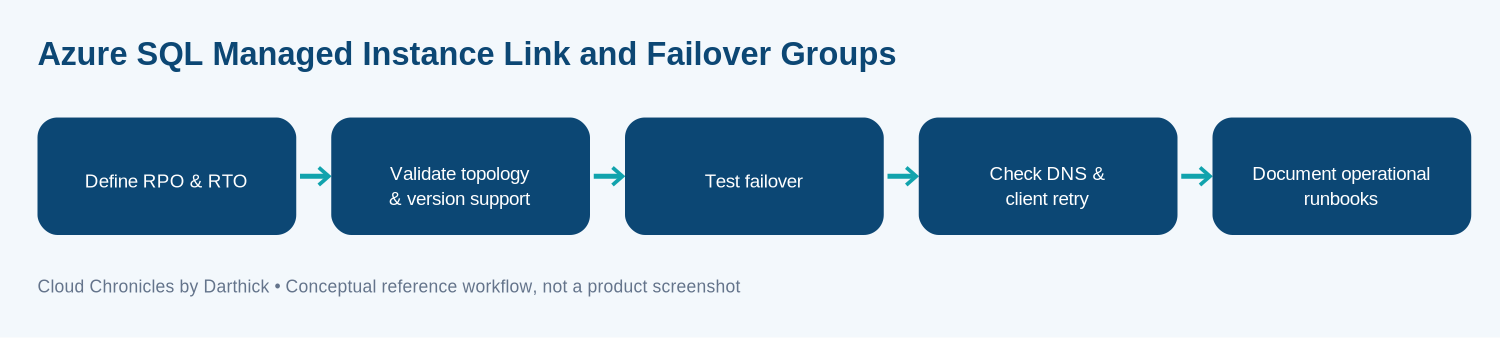
Define RPO and RTO
Defining Recovery Point Objective and Recovery Time Objective is a distinct design checkpoint. You must identify the business owner, expected data throughput, acceptable data loss window during catastrophic failures, and the exact manual or automated steps required for recovery. For hybrid links, synchronous versus asynchronous commit modes dictate your RPO. Document the trade-off between fully managed cloud services and custom implementation before moving workloads into staging environments.
Validate Topology and Version Support
Validating topology and version support ensures that your source SQL Server instance and destination Managed Instance tier are fully compatible. The Managed Instance Link requires specific cumulative updates for SQL Server 2019 and 2022, alongside proper network routing via ExpressRoute or VPN gateways. Verify that firewall rules permit TCP port 5022 for database mirroring endpoints and port 1433 for SQL traffic.
Test Failover Scenarios
Testing failover is non-negotiable. Conduct both planned failovers for routine maintenance windows and forced failovers simulating regional datacenter outages. Measure how long it takes for the database engine to transition roles and verify that transaction rollbacks or commit completions behave as expected under extreme operational stress.
Check DNS and Client Retry Logic
When a failover occurs, client applications must reconnect swiftly. Check DNS propagation times and ensure your connection strings utilize listener endpoints or Failover Group DNS names. Implement robust exponential backoff retry logic in your application data access layer to handle transient connection drops during the role transition.
Document Operational Runbooks
Document operational runbooks detailing step-by-step instructions for monitoring replication lag, breaking the link after migration, cutting back to on-premises if needed, and escalating critical alerts to the on-call database engineering team.
Technical Comparison: Managed Instance Link vs. Failover Groups
Choosing the right architectural pattern depends entirely on your primary source environment and disaster recovery targets. Review the specification table below to align your requirements with the appropriate Azure feature.
Failover testing
Enterprise data protection demands uncompromising adherence to security baselines. When configuring hybrid links and failover groups, use Microsoft Entra identities wherever supported, enforce least-privilege Role-Based Access Control, and manage database secrets securely within Azure Key Vault. Establish explicit network trust boundaries utilizing network security groups, route tables, and private endpoints.
Furthermore, define a comprehensive data retention policy, establish formal approval gates for consequential actions such as forced failovers, and assign an incident response owner. Never hardcode credentials, connection strings, or service principal secrets in source code repositories, deployment scripts, or telemetry logs.
Application reconnection
Building a resilient database tier goes beyond initial configuration. Engineering teams must rigorously test retries, partial network failures, bandwidth throttling, regional service unavailability, and graceful rollback procedures. Make all side-effecting deployment operations idempotent to prevent partial script execution errors.
Collect granular telemetry on replication latency, error rates, resource consumption, and dependency health. Create a dedicated operational runbook detailing how to safely disable or isolate the feature without interrupting unrelated business workloads.
From a financial perspective, architects must estimate infrastructure compute, API usage, storage tiers, cross-region egress networking, telemetry ingestion, and enterprise support costs. Always benchmark a representative workload in a staging environment rather than projecting costs solely from vendor examples. Set strict budget alerts and apply proper cost center tagging across all associated Azure resources.
Final assessment
Azure SQL Managed Instance Link and Failover Groups should be evaluated as core architectural capabilities rather than simple feature checkboxes. By starting with clear operational requirements, validating current service contracts, and adopting cloud patterns incrementally with empirical evidence from a controlled pilot, your organization can achieve robust, enterprise-grade business continuity.
For official technical documentation, architectural whitepapers, and the latest release notes, consult the Microsoft Azure SQL Managed Instance Documentation.
More articles on Data & Analytics are available in the blog archive.
Plan Your Hybrid Migration Strategy
Explore expert architectural guidance to secure your enterprise data workflows.