
Introduction to Azure SQL Estate Visibility and Custom Views
For cloud solution architects and enterprise database administrators, achieving absolute visibility across a sprawling cloud footprint remains one of the most complex operational hurdles. As organizations scale their cloud migration strategies, databases proliferate across multiple subscriptions, resource groups, and regions. The critical challenge is not merely whether monitoring capabilities exist within the native tooling, but whether that data can be synthesized, operated at scale, integrated securely with enterprise platforms, and managed cost-effectively without creating operational blind spots. This guide explores a practical decision framework for establishing robust Azure SQL Estate Visibility and Custom Views across your enterprise infrastructure.
When managing dozens, hundreds, or even thousands of Azure SQL Database, Azure SQL Managed Instance, and SQL Server on Azure Virtual Machines instances, standard portal navigation quickly falls short. Architects must implement programmatic discovery mechanisms, centralized tagging taxonomies, and custom visualization layers. This ensures that infrastructure owners, security teams, and finance departments share a single source of truth regarding operational health, security posture, modernization readiness, and financial expenditure.
The visibility gap
A sound cloud adoption and governance decision must carefully evaluate multiple architectural dimensions, including identity and access management, network boundaries, deployment automation, centralized logging, data classification, disaster recovery preparedness, and total cost of ownership. When organizations overlook centralized SQL estate visibility, they frequently encounter cascading problems:
- Orphaned and Untagged Resources: Databases provisioned during rapid proof-of-concept phases that lack department or cost center tags, making cost allocation nearly impossible.
- Security Blind Spots: Outdated database engine versions, missing vulnerability assessments, or overly permissive access controls hidden deep within secondary subscriptions.
- Capacity and Performance Inefficiencies: Over-provisioned compute resources sitting idle alongside under-provisioned databases experiencing frequent throttling.
- Modernization Resistance: Inability to quickly identify legacy SQL Server instances running on virtual machines that are prime candidates for containerization or fully managed platform-as-a-service (PaaS) migration.
By implementing a structured visibility framework utilizing Azure Resource Graph, Azure Monitor, and customized visualization views, architects can transform reactive database management into a proactive governance model.
A useful estate inventory
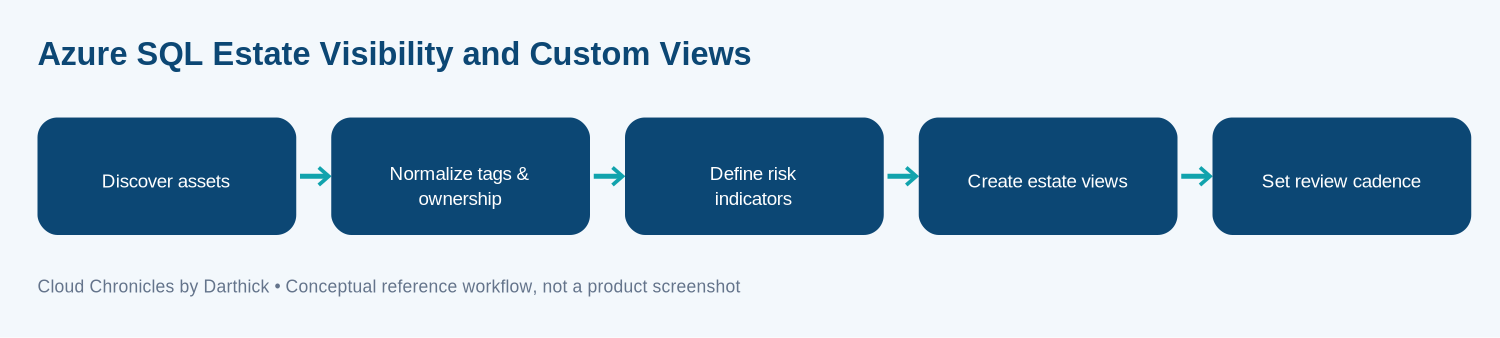
Designing an effective estate visibility solution requires a structured multi-stage data pipeline. The conceptual implementation sequence moves from raw resource discovery to executive dashboard consumption. Organizations should adapt this workflow to fit their specific enterprise landing zone and cloud operating model.
Asset Discovery
Query all subscriptions continuously using Azure Resource Graph to catalog every database instance.
Normalization
Enforce tagging standards and map ownership boundaries across disparate business units.
Risk Indicators
Evaluate configuration compliance, security vulnerabilities, and backup health metrics.
Custom Views
Aggregate data into role-specific dashboards for technical operators and finance leaders.
This reference model serves as a logical blueprint. It highlights the separation of concerns between underlying data collection and top-level executive reporting, ensuring high performance even when managing vast cloud estates.
Turning inventory into decisions
Moving from architectural theory to practical implementation requires rigorous adherence to operational checkpoints. Each phase of the estate visibility lifecycle must be planned, tested, and validated against enterprise security and reliability standards.
Discovering Assets Across Enterprise Subscriptions
Asset discovery is a foundational operational checkpoint. Architects must define clear resource owners, expected input parameters, query output schemas, failure modes, and least-privilege access controls before production deployment. When executing discovery queries across enterprise tenants, Azure Resource Graph (ARG) provides a powerful alternative to traditional subscription-by-subscription enumeration.
ARG allows engineers to query resource configurations across thousands of subscriptions using Kusto Query Language (KQL). By writing efficient ARG queries, platform teams can instantly extract properties such as SKU tiers, storage utilization, database collation settings, and geographic regions without placing direct performance overhead on the underlying production databases.
Normalizing Tags and Ownership Taxonomies
Data without context has limited operational value. Normalizing tags and ownership requires establishing a strict enterprise governance policy supported by Azure Policy definitions. Common mandatory tags should include:
- Environment: Production, Staging, Development, Test.
- CostCenter: Financial accounting code for chargeback and showback reporting.
- Owner: Primary email or distribution group responsible for database maintenance.
- DataClassification: Public, Internal, Confidential, or Restricted based on data sensitivity.
When automated discovery detects untagged resources, alerting workflows should notify the respective subscription owners or automatically log remediation tickets, preventing governance drift.
Defining Risk and Health Indicators
A comprehensive SQL estate view must incorporate telemetry regarding security hygiene, performance bottlenecks, and disaster recovery readiness. Key risk indicators to track include:
- Databases lacking active Geo-Replication or long-term backup retention policies.
- Instances experiencing persistent CPU, memory, or storage IOPS throttling exceeding defined thresholds.
- Outdated database engine patches or missing Defender for Cloud vulnerability assessments.
- Public network accessibility enabled on databases that should reside exclusively behind private endpoints.
Creating Tailored Estate Views
Different stakeholders require different lenses into the SQL estate. Database administrators need deep performance metrics and index health; security officers require firewall configurations and encryption status; finance leaders require cost trends and tier optimization opportunities. Custom views should be constructed using Azure Workbooks, Power BI connected to Azure Monitor data exporters, or centralized database management hubs where appropriate.
Establishing Review Cadences and Lifecycle Management
Visibility tools degrade in value if they are not actively monitored and governed. Establish an operational review cadence, weekly reviews for technical reliability and security anomalies, and monthly reviews for financial optimization and modernization planning. Furthermore, ensure that the visibility pipeline itself has a documented disaster recovery and rollback runbook.
Access to inventory
When implementing centralized reporting and custom views that aggregate metadata from an entire enterprise SQL estate, security must be paramount. Centralized tooling naturally attracts elevated privileges, making it a prime target for security audits.
Adhere strictly to the principle of least privilege. Use Microsoft Entra ID (formerly Azure Active Directory) for authentication wherever supported, avoiding hardcoded SQL service accounts or administrative credentials. Store all connection strings, API tokens, and service principal secrets securely within Azure Key Vault, utilizing managed identities for compute resources that execute discovery queries.
Additionally, define clear data retention policies for telemetry and estate metadata. Ensure that sensitive configuration strings or connection properties are masked or encrypted at rest and in transit.
Keeping the view current
Monitoring infrastructure must never become a single point of failure for production workloads. When designing custom estate visibility scripts, Azure Resource Graph queries, or automated workbook refreshes, engineers must build in robust error handling, retry logic, and circuit breakers.
Because enterprise subscriptions operate at scale, API throttling is a common operational hurdle. Implement exponential backoff algorithms for automation runbooks that query Azure Resource Manager APIs or Azure Monitor endpoints. Furthermore, design all side-effecting operations to be strictly idempotent so that failed runs can be retried safely without duplicating records or corrupting metadata stores.
Maintain comprehensive operational telemetry for the monitoring pipeline itself, tracking query latency, API error rates, and dependency health. Create an operational runbook detailing exact steps to disable, isolate, or bypass the visibility pipeline if an underlying query engine or storage account experiences regional degradation.
Health signals
Establishing estate visibility is designed to save money, but the tooling itself incurs operational costs that must be managed. Architects must evaluate infrastructure expenses, API request charges, Log Analytics ingestion costs, storage utilization, and cross-region networking fees.
Avoid projecting cost models solely from vendor marketing examples. Instead, benchmark a representative pilot workload in a non-production subscription to measure actual log generation volume and query compute consumption. Set up granular budget alerts within Azure Cost Management and ensure that every resource associated with the visibility platform is correctly tagged with appropriate cost center attribution.
Final assessment
Achieving comprehensive Azure SQL estate visibility and building custom views is an architectural journey rather than a simple configuration task. By approaching estate governance with a rigorous framework, focusing on programmatic discovery, normalized tagging, robust security boundaries, and disciplined FinOps practices, organizations can eliminate operational blind spots and empower their engineering teams.
Start by auditing your current subscription landscape, establishing baseline tagging standards, and piloting lightweight Azure Resource Graph queries. Combine these technical foundations with executive-level custom views to maintain total clarity across your evolving cloud database ecosystem.
More articles on Data & Analytics are available in the blog archive.