
What the registry can tell you
As organizations scale their cloud-native container workloads, Azure Container Registry (ACR) sits at the critical nexus of the software supply chain. Ensuring its high availability, tracking image pull latencies, and auditing authentication requests are no longer optional tasks; they are core requirements for enterprise governance. This comprehensive guide outlines the architectural considerations, implementation checkpoints, and operational best practices required to build robust monitoring pipelines for your container registries.
Signals for failures and abuse
Create operational dashboards for container registry health, artifact consumption, and deployment reliability. A sound adoption decision should carefully consider identity management, network boundaries, deployment automation, logging granularity, data classification, disaster recovery, and total cost of ownership. Preview capabilities deserve additional attention regarding strict service limits, quota restrictions, and long-term support commitments from Microsoft.
Without deep visibility into registry metrics, development teams often face silent pipeline failures, unexpected network throttling, and difficult-to-diagnose authentication blocks. When a Kubernetes cluster running in production cannot pull a container image during an automated scaling event or an emergency rollout, every second of delay directly impacts business continuity. Establishing structured metric collection, granular diagnostic settings, and proactive alerting ensures that your platform engineering team remains ahead of potential performance bottlenecks.
Building useful alerts
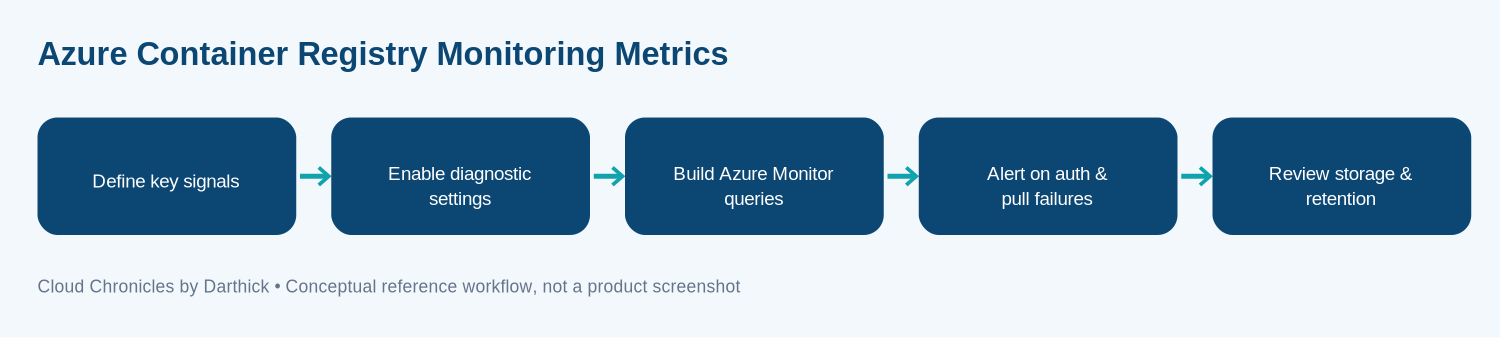
The conceptual implementation sequence outlined here helps structure your monitoring pipeline. Rather than viewing monitoring as an afterthought, platform architects should embed metric ingestion directly into the landing zone deployment workflow.
Signal Definition
Identify core telemetry requirements, including throughput, storage consumption, and error rates.
Diagnostic Pipeline
Route platform logs and metrics directly to Log Analytics workspaces and Azure Monitor.
Visualization
Construct role-based operational dashboards for SREs, developers, and security auditors.
Proactive Alerting
Configure intelligent alerts for authentication failures, storage thresholds, and bandwidth spikes.
This flow is designed to integrate seamlessly into your organization’s broader cloud governance model. Adapt each stage to fit your specific enterprise scale and regulatory compliance requirements.
Authentication and access
Define Key Signals
Defining key signals is a distinct design and operational checkpoint. You must explicitly define the resource owner, expected input and output parameters, potential failure modes, access control boundaries, and evidence required before any production rollout. For Azure Container Registry monitoring metrics, document the trade-offs between utilizing fully managed platform services versus building custom scraping solutions.
Key performance indicators typically include total storage utilization, incoming push operations, outgoing pull volume, authenticated requests, and replication lag across geo-replicated registries. Establishing clear baselines for these metrics during non-peak hours allows operations teams to easily spot anomalous behavior when deployments surge.
Enable Diagnostic Settings
Enabling diagnostic settings is a distinct design and operational checkpoint. Platform engineers need to route registry logs, such as ContainerRegistryRepositoryEvents and ContainerRegistryAuthenticationEvents, to centralized sinks like Azure Monitor Logs, Event Hubs, or external SIEM platforms.
When configuring these diagnostic settings at scale, infrastructure-as-code (IaC) tools such as Bicep or Terraform should enforce uniform logging across all development, staging, and production registries within your subscription hierarchy.
Build Azure Monitor Queries
Building Azure Monitor queries helps transform raw log data into actionable operational insights. Using Kusto Query Language (KQL), platform operators can track historical trends in image consumption and isolate intermittent network dropouts.
For example, a standard KQL query can track failed authentication attempts across specific repositories, helping security teams identify misconfigured service principals or expired credentials before they cause deployment outages in production clusters.
Alert on Auth and Pull Failures
Alerting on authentication and pull failures is a vital safeguard. When continuous integration and continuous deployment (CI/CD) pipelines fail to authenticate against your registry, engineers need immediate notification.
Configure action groups within Azure Monitor to route critical alerts directly to PagerDuty, Microsoft Teams, or webhook endpoints. Ensure that alert rules distinguish between transient network blips and persistent authorization misconfigurations to minimize alert fatigue among on-call personnel.
Review Storage and Retention
Reviewing storage tiers and log retention policies prevents unexpected cost overruns. As organizations push thousands of container image tags over time, registries can accumulate significant storage overhead. Implementing lifecycle management policies to automatically purge untagged manifests and stale artifacts is essential for maintaining a healthy and cost-effective Azure Container Registry environment.
Operational troubleshooting
Security must be embedded into every layer of container registry monitoring. Use Microsoft Entra identities wherever supported, enforce strict least-privilege Role-Based Access Control (RBAC), and manage secrets securely in Azure Key Vault. Establish explicit network trust boundaries utilizing private endpoints, and maintain structured audit logs for compliance verification.
Define a clear data retention policy, establish approval workflows for consequential administrative actions, and assign a dedicated incident response owner for registry security events. Regular access reviews ensure that former contractors or decommissioned pipelines lose registry access immediately.
Retention and diagnostics
To ensure high availability, test your monitoring and registry infrastructure against various failure scenarios, including regional outages, network throttling, and partial service degradation. Make all side-effecting automation operations strictly idempotent. Collect latency metrics, error rates, and dependency health indicators consistently across all environments.
Create a comprehensive operational runbook that explicitly outlines how to disable, isolate, or troubleshoot monitoring integrations without interrupting unrelated workloads or delaying emergency hotfix deployments.
Registry costs
Cloud financial management requires careful estimation of infrastructure, API usage, storage tiers, telemetry ingestion, networking egress, and support costs. Always benchmark a representative workload rather than projecting expenses solely from theoretical vendor examples.
Set up proactive Azure Budgets and cost alerts tied directly to your resource groups and cost centers. For any preview features or advanced diagnostic capabilities, verify billing terms and Service Level Agreements (SLAs) before approving production adoption.
The practical takeaway
Azure Container Registry Monitoring Metrics should be evaluated as a foundational architectural capability rather than a simple feature checkbox. Start by defining clear operational requirements, validate the current service contract, and adopt monitoring practices incrementally supported by hard evidence from a controlled pilot environment.
Further reading
Consult the official Microsoft Azure Container Registry documentation for the most up-to-date guidance. Always verify the latest API versions, regional availability, and related release notes before deploying solutions to production environments.
More articles on DevOps & Automation are available in the blog archive.