Welcome to another edition of Cloud Chronicles by Darthick. As we navigate the rapidly evolving landscape of cloud computing in late 2026, Microsoft Azure continues to solidify its position as an enterprise powerhouse. Organizations across the globe are no longer just migrating workloads to the cloud; they are modernizing applications, leveraging advanced artificial intelligence, optimizing cost frameworks, and securing hyper-distributed environments. In this exhaustive editorial, we dive deep into the architectural paradigms, migration methodologies, and best practices that define modern Azure engineering. Whether you are a cloud architect, a DevOps engineer, or an IT executive, this guide aims to provide actionable insights to elevate your Azure strategy.
1. The Evolution of Azure Architecture: From Virtual Machines to Serverless and Intelligent Systems
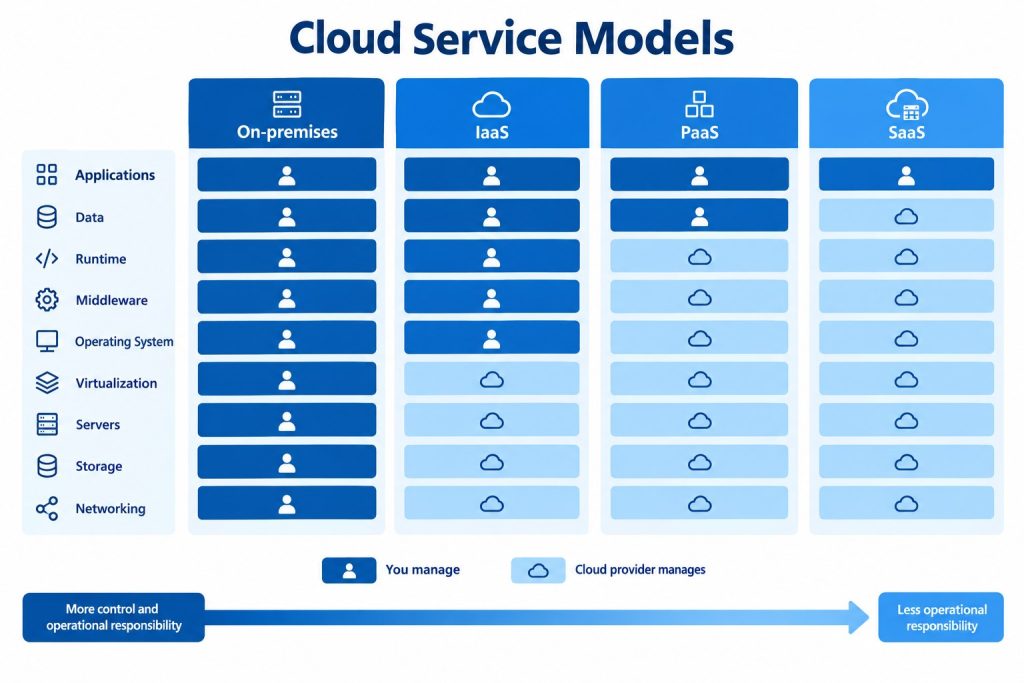
The journey of cloud architecture has undergone a radical transformation over the past decade. In the early days of cloud adoption, organizations simply “lifted and shifted” their physical and virtualized on-premises workloads into Azure Virtual Machines (VMs). While this provided a quick exit strategy from aging hardware data centers, it failed to harness the true elasticity, resilience, and cost-efficiency of cloud-native computing. Today, modern Azure architecture is defined by microservices, containerization, serverless compute, and integrated artificial intelligence.
When designing robust applications in Azure, architects must embrace the Well-Architected Framework, which rests on six core pillars: Reliability, Security, Cost Optimization, Operational Excellence, Performance Efficiency, and Sustainability. Let us examine how these pillars manifest in modern architectural patterns:
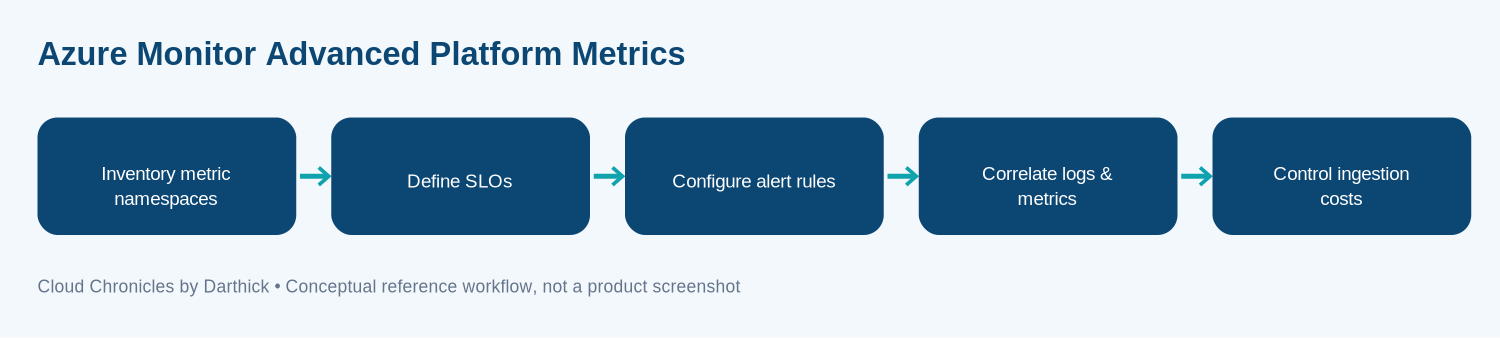
- Decoupled Microservices with Azure Kubernetes Service (AKS): Monolithic applications are increasingly obsolete in high-scale environments. AKS allows organizations to orchestrate containerized workloads with enterprise-grade security, automated scaling, and integrated monitoring through Azure Monitor and Container Insights. Best practices dictate implementing GitOps workflows using tools like Flux or ArgoCD to manage cluster configurations declaratively.
- Serverless Paradigms: For event-driven architectures, leveraging Azure Functions, Azure Logic Apps, and Azure Event Grid eliminates the operational overhead of managing underlying infrastructure. Serverless computing scales instantly from zero to thousands of instances, ensuring you only pay for the exact millisecond compute time consumed.
- Data Estate Modernization: Relational databases are no longer confined to single-instance SQL servers. Azure SQL Database, Azure Cosmos DB for globally distributed NoSQL needs, and Azure Database for PostgreSQL provide managed scalability, automated backups, and industry-leading security features like Always Encrypted and Advanced Threat Protection.
2. Comprehensive Migration Strategies: Moving from Legacy to Cloud-Native
Migrating enterprise applications to Azure requires meticulous planning, rigorous assessment, and a phased execution strategy. Too many organizations fail in their cloud journey due to inadequate preparation. To ensure success, architects and project managers should follow the Microsoft Cloud Adoption Framework (CAF).
The migration journey typically follows these critical phases:
- Strategy and Planning: Define clear business motivations and expected outcomes. Are you migrating for agility, disaster recovery, cost reduction, or AI integration? Establish a Cloud Center of Excellence (CCoE) to govern policies and oversee the migration process.
- Discovery and Assessment: Utilize tools like Azure Migrate to inventory your existing on-premises servers, databases, and application dependencies. Azure Migrate assesses performance metrics, calculates right-sized Azure resource configurations, and estimates total cost of ownership (TCO).
- The 7 Rs of Migration: Categorize every workload into one of seven migration strategies: Rehost (lift and shift), Refactor (repackage for cloud-native), Rearchitect (modify application code for scale), Rebuild (rewrite from scratch using cloud services), Replace (swap for a SaaS solution), Retain (keep on-premises for compliance or latency reasons), or Retire (decommission obsolete systems).
- Execution and Optimization: Execute migrations in controlled waves, starting with low-risk, non-critical workloads to build internal expertise and iron out deployment pipelines. Once workloads are running in Azure, continuously monitor resource utilization and apply rightsizing recommendations.
3. Deep Dive: DevOps, CI/CD, and Infrastructure as Code (IaC) on Azure
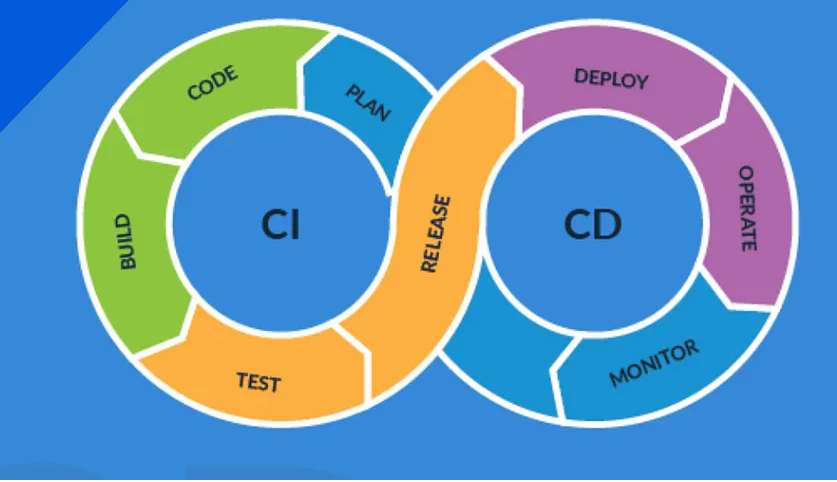
Operational excellence in the cloud is impossible without mature automation practices. Manual provisioning of Azure resources leads to configuration drift, security vulnerabilities, and inconsistent environments between development, staging, and production. Modern Azure engineering relies heavily on Infrastructure as Code (IaC) and continuous integration/continuous deployment (CI/CD) pipelines.
Teams typically choose between two primary IaC ecosystems on Azure:
- Bicep and Azure Resource Manager (ARM): Bicep is a domain-specific language (DSL) developed by Microsoft that transparently deploys Azure ARM templates. It offers cleaner syntax, modular code structures, type safety, and automatic dependency resolution, making it the native choice for Azure-centric teams.
- HashiCorp Terraform: For multi-cloud organizations or enterprises requiring cloud-agnostic provisioning scripts, Terraform remains an industry standard. Terraform providers for Azure offer comprehensive coverage of all Azure resource types and support advanced state management paradigms.
To implement a robust CI/CD pipeline, organizations leverage either Azure DevOps (formerly VSTS) or GitHub Actions. A standard enterprise deployment pipeline should incorporate several automated gating stages:
- Static Code Analysis: Scanning Bicep or Terraform files for security flaws and compliance violations using tools like Checkov, Tflint, or Microsoft Defender for DevOps.
- Automated Testing: Running unit tests, integration tests, and security penetration testing against ephemeral staging environments.
- Policy Enforcement: Utilizing Azure Policy to block non-compliant resource deployments before they ever touch production environments. Examples include enforcing mandatory tagging, restricting allowed Azure regions, and preventing the deployment of unencrypted storage accounts.
4. Securing the Modern Cloud Estate: Zero Trust and Microsoft Entra ID
In an era of sophisticated cyber threats and ubiquitous remote work, traditional perimeter-based network security is dead. Azure security engineering is built around the Zero Trust model, which operates on three core principles: Verify explicitly, least privilege access, and assume breach.
Identity is the new security perimeter, managed centrally through Microsoft Entra ID (formerly Azure Active Directory). Implementing a robust security posture requires configuring several advanced features:
- Conditional Access Policies: Enforce adaptive access controls based on user identity, device compliance, location, and real-time risk scoring. Require phishing-resistant Multi-Factor Authentication (MFA) for all administrative and standard user accounts.
- Privileged Identity Management (PIM): Eliminate standing administrator access. With PIM, administrators must request elevated permissions just-in-time (JIT) with time-bound activations and mandatory managerial approvals or justification logs.
- Microsoft Defender for Cloud: A comprehensive Cloud Security Posture Management (CSPM) and Cloud Workload Protection Platform (CWPP) that continuously assesses your Azure resources, detects threats across VMs, containers, databases, and storage, and provides actionable remediation steps.
5. Optimizing Cloud Economics: FinOps and Cost Management in Azure
One of the most common pitfalls organizations face after migrating to Azure is uncontrolled cloud spend. Without active governance, “cloud sprawl” quickly leads to bloated monthly invoices. Enter FinOps (Financial Operations), an operational framework that brings financial accountability to the variable spend model of cloud computing, enabling distributed teams to make business trade-offs between speed, cost, and quality.
Key strategies for optimizing Azure expenditures include:
- Right-Sizing Resources: Regularly review Azure Advisor recommendations to identify underutilized VMs, oversized databases, and orphaned disks that are consuming billable storage without serving production traffic.
- Commitment-Based Discounts: Utilize Azure Reserved Instances (RIs) and Azure Savings Plans for compute workloads with steady-state requirements. Committing to a 1-year or 3-year term can yield savings of up to 72% compared to pay-as-you-go pricing.
- Azure Spot Virtual Machines: Leverage unused Azure compute capacity for batch processing, dev/test environments, and fault-tolerant container workloads at discounts of up to 90%. Ensure your applications are architected to handle sudden evictions gracefully.
- Automated Budgets and Alerts: Set up granular budget thresholds in Azure Cost Management with automated alerts and logic apps that can notify stakeholders or even automatically shut down non-production environments outside of standard working hours.
6. Case Studies: Real-World Azure Transformations
To contextualize these principles, let us examine two anonymized enterprise case studies from our consulting engagements at Cloud Chronicles:
Case Study A: Global Financial Services Institution
A tier-one European bank needed to migrate its legacy core banking systems to a secure, compliant cloud environment while adhering to strict European Banking Authority (EBA) regulations. By adopting a hybrid architecture utilizing Azure ExpressRoute for dedicated, high-speed connectivity and Azure VMware Solution (AVS) for lifting and shifting complex legacy VMs, the bank reduced data center operational costs by 35%. Furthermore, implementing Microsoft Purview for data governance and automated compliance scanning allowed the institution to pass regulatory audits with zero non-compliance findings.
Case Study B: Multinational E-Commerce Retailer
A high-volume global retailer faced severe latency and scalability bottlenecks during peak shopping events like Black Friday. By rearchitecting their monolithic backend into a distributed microservices architecture hosted on Azure Kubernetes Service (AKS), fronted by Azure Front Door for global content delivery and web application firewall (WAF) protection, the retailer successfully scaled to handle over 10 million concurrent users without a single minute of downtime. Backend data operations were optimized by sharding data across globally replicated Azure Cosmos DB instances, ensuring sub-10millisecond read latencies worldwide.
7. Looking Ahead: The Future of Azure and Cloud Engineering
As we look beyond late 2026, the convergence of cloud computing and artificial intelligence will only accelerate. Azure is rapidly evolving into an intelligent operating system for the enterprise. The deep integration of OpenAI models through Azure OpenAI Service enables organizations to embed generative AI directly into their cloud applications, data pipelines, and security operations centers.
Cloud architects must remain agile, continuously updating their skill sets through continuous learning platforms like Microsoft Learn, obtaining industry certifications such as the Azure Solutions Architect Expert or DevOps Engineer Expert, and actively participating in cloud engineering communities. The cloud is not a static destination; it is a continuous journey of innovation, optimization, and transformation.
Thank you for joining this edition of Cloud Chronicles by Darthick. Stay tuned for our next deep-dive issue, where we will explore advanced generative AI deployment patterns on Azure Kubernetes Service. Until then, keep architecting for scale, security, and resilience.
More articles on Azure Cloud are available in the blog archive.